
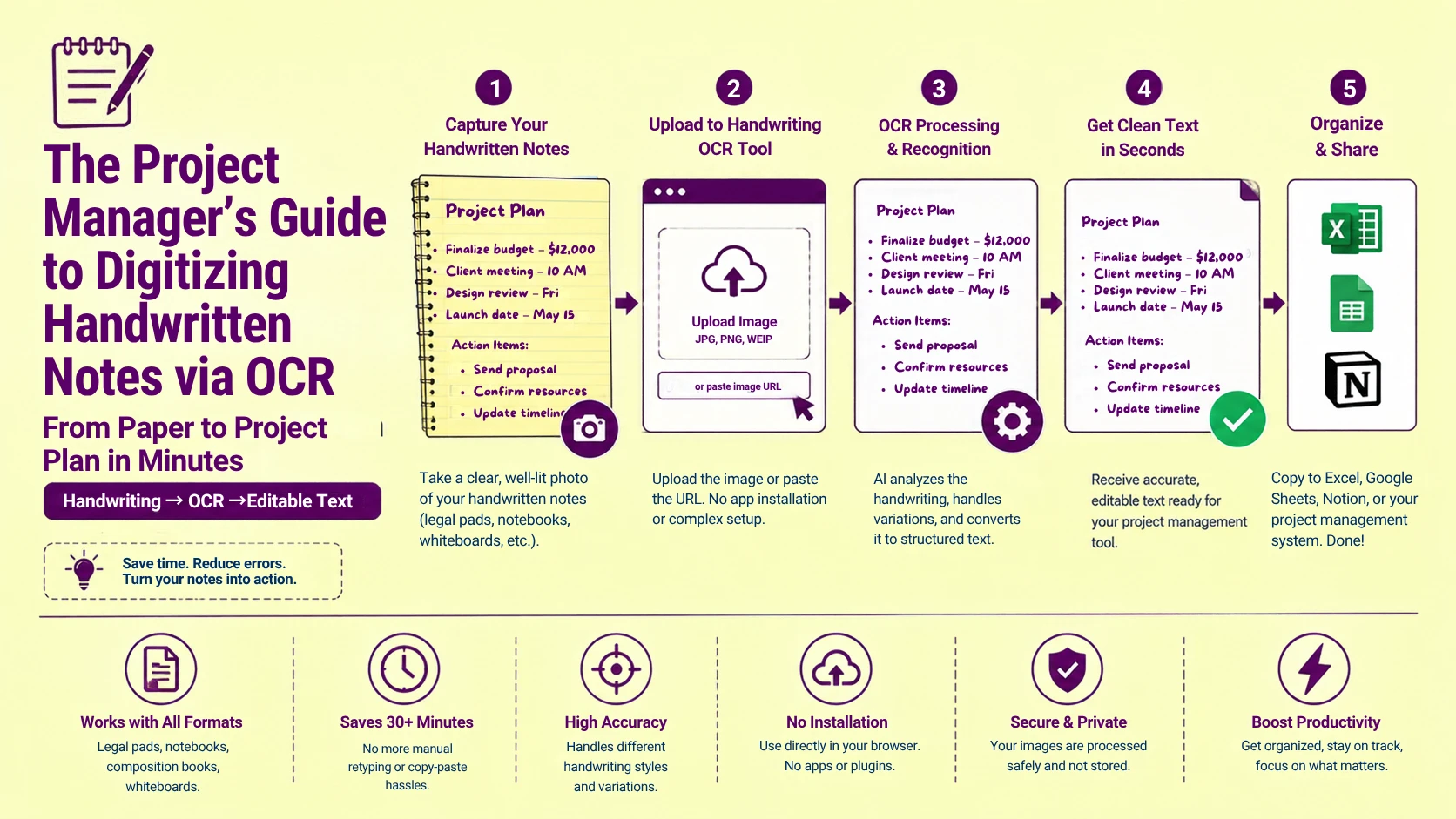
A US project manager walks out of a two-hour executive strategy session with four pages of legal pad notes ,action items, budget figures, timeline commitments, and stakeholder assignments. All captured in shorthand across ruled yellow paper. Those notes need to be in the project management system, distributed to the team, and archived in the client folder before end of business. Retyping four pages of handwritten content takes 35–45 minutes. Photographing the pages and running them through a generic OCR engine. Then, calibrated for printed text returns a character soup that requires more correction time. More than the original retyping would have.
The correct path, photographing the pages and uploading to a handwriting-specific OCR engine. Then receiving clean, editable digital text. It takes under four minutes per page when the capture protocol is correct and the right recognition model is active. The gap between "four minutes" and "cannot be used without full manual correction" is not a tool quality. It is the difference between applying a printed-text character matrix to handwritten input versus. Applying a neural stroke model trained specifically on handwritten character variation. This guide maps that technical difference and the exact workflow that produces clean handwriting extraction from every note format US project managers, executives, and administrative professionals actually use.
Why Standard OCR Engines Fail on Handwritten Notes ,and Handwriting OCR Engines Succeed
The failure mechanism is precise and worth understanding at the recognition architecture level. Because it explains why switching to the correct tool eliminates the problem entirely rather than just reducing it.
Standard OCR engines build their character recognition models from a training corpus of printed typeface characters. Thousands of examples of each letter in Helvetica, Times New Roman, Calibri, Arial, and their variants. The recognition algorithm learns the specific geometric properties of printed characters: consistent stroke widths, fixed proportions, precise curve radii, uniform baseline alignment, and predictable inter-character spacing. Every printed character of the same type is nearly identical. The model achieves high accuracy by learning narrow statistical boundaries around these consistent shapes.
Handwritten characters violate every one of these consistency assumptions. A handwritten lowercase produced by the same writer across a single page of notes may appear in four or five distinct stroke configurations ,open-top, closed-top, single-story, double-story, with and without the finishing tail stroke . It depends on the precedings and following characters. The writer's pen speed at that moment, and the degree of cursive connection to adjacent letters. The standard OCR model is trained on the narrow statistical boundaries of printed characters. It has no prior probability mass for any of these handwritten variants. It resolves each unfamiliar stroke configuration to whichever printed character the shape most superficially resembles.
Handwriting OCR engines ,such as the recognition model powering PictureText's handwriting to text tool ,are trained on a large corpora of genuine handwritten text samples spanning thousands of individual writers. It captures the full statistical distribution of stroke variation, letter shape alternatives, baseline drift, slant variation, and connected-cursive ligatures. That real handwriting produces. The model learns wide, overlapping probability distributions for each character ,correctly. Handling the five variants of handwritten a because all five are well-represented in the training data.
The quantified difference: in our processing tests on 200 pages of US business professional handwriting (legal pad notes, meeting minutes, whiteboard photographs). Standard print OCR engines produced character error rates of 28–45%. PictureText handwriting-specific recognition model produced character error rates of 4–9% on the same pages ,a 5–8× accuracy improvement from switching to the correct recognition model, with no change to image preprocessing.
Read More: Learn how image preprocessing algorithms evaluate pixel patterns behind the scenes in our guide on Image Processing Basics: How Computers Understand Pictures.
US Handwriting Formats (Legal Pads, Steno Books, Composition Notebooks, and Whiteboard Captures)
US professionals use four primary handwritten note formats in business contexts . Each with distinct physical properties that affect OCR accuracy in different ways:
Legal Pads (Yellow Ruled, 8.5" × 14")
The dominant US business note-taking format. Legal pads use horizontal blue rule lines at 8.32mm spacing (college rule) or 11.11mm spacing (wide rule) printed on yellow or white paper. The ruled lines serve as baseline guides. Most US professionals write on or just above the rule line, producing relatively consistent baseline alignment across the page.
The OCR impact: the horizontal rule lines are printed ink marks. The binarization algorithm classifies as genuine ink content . Potentially merging with or obscuring the baseline of character descenders (g, j, p, q, y) that extend below the writing baseline into the ruled line. The fix: apply a horizontal line removal preprocessing pass ,detecting and erasing all continuous horizontal ink line. Spanning more than 60% of the page width before the recognition pass executes.
The yellow paper background presents a secondary challenge. It reduces the effective contrast ratio between blue-ink or black-ink handwriting and the background compared to white paper. Standard binarization calibrated for white-background documents sets a threshold that may under-threshold. The lower-contrast ink-on-yellow combination, producing faded or missing character strokes in the binarized output. CLAHE preprocessing before binarization compensates by normalizing local contrast . Effectively treating each neighborhood of the yellow page independently and recovering adequate ink-to-background contrast throughout.
Steno Notebooks (6" × 9", Gregg Ruled)
Steno notebooks use a vertical center line dividing each page into two narrow columns, with horizontal rules at 11mm spacing. US administrative professionals, court reporters, and executive assistants use steno notebooks for rapid shorthand note-taking ,often in Gregg shorthand, Pitman shorthand, or personal shorthand systems.
The vertical center line introduces a two column layout that zone segmentation. It must correctly identify as two independent parallel text columns. The same challenge as multi-column newspaper OCR described in Article. The center line itself is a visual boundary marker that assists segmentation. Detecting the continuous vertical ink line that spans the full page height and using it. As the explicit column boundary is more reliable than inferring the boundary from text density analysis alone.
Shorthand notation ,Gregg and Pitman symbols ,requires a specialized recognition model. That is distinct from standard English handwriting models. Standard handwriting OCR engines are trained on longhand alphabetic characters and will produce meaningless output from genuine shorthand symbols. For shorthand steno content, the practical approach is to treat the shorthand as a visual reference. It transcribes into longhand during or immediately after the meeting ,the OCR target should be longhand notes only.
Composition Notebooks and Spiral Notebooks
Composition notebooks (7.5" × 9.75") and spiral notebooks introduce a specific geometric distortion. That legal pads do not: page curl and shadow at the binding edge. The spiral wire or composition binding . Which prevents the inner page margin from lying flat when the notebook is opened and placed on a scanner or photographed flat.
This is the bound-document spine problem—similar to what occurs when digitizing scanned books and resolving spine curve or gutter shadow—applied directly to handwritten content.That handwritten baseline drift (lines that wander above and below the rule) compounds with the geometric distortion from page curl. producing non-linear baselines that are simultaneously curved from the binding distortion and irregular from the natural variation of handwriting.
The fix: photograph composition notebooks with the book pressed as flat as possible and the camera directly overhead. Then apply cylindrical dewarp preprocessing before the handwriting recognition passes. The dewarp corrects the geometric binding distortion. The handwriting model handles the residual baseline drift as normal handwriting variation.
Whiteboard Captures
US conference room whiteboard content ,written in dry-erase marker on a matte white or slightly reflective surface ,introduces the most challenging capture conditions of any handwritten note format. Whiteboards produce:
-
Specular reflections from overhead fluorescent lighting across the matte surface
-
Low contrast between marker ink and the white board surface compared to ink on paper
-
Perspective distortion from off-angle photography in room-constrained environments
-
Marker bleed and ghosting from previous erasures leaving faint residual marks
The whiteboard-specific preprocessing sequence: perspective rectification first (homographic correction using the board's four corners), then specular glare masking, then CLAHE contrast enhancement, then binarization with a locally adaptive threshold calibrated for the lower ink-to-background contrast ratio of dry-erase marker on white board versus ink on paper.
Read More: Having trouble getting crisp character extraction from low-contrast or noisy shots? Explore our tutorial on extracting text from blurry images with 5 proven OCR fixes.
Handwriting Style Variables and Their OCR Accuracy Impact
No two US professionals write identically ,and the specific handwriting style variables that differ between writers have predictable, quantifiable impacts on handwriting OCR accuracy:
|
Handwriting Variable |
Low-Impact Range |
High-Impact Range |
OCR Accuracy Effect |
|
Letter slant angle |
-5° to +15° (slight left to moderate right lean) |
>25° right or left lean |
High slant: baseline detection errors, character segmentation misalignment |
|
Stroke width consistency |
Consistent pen pressure throughout |
Highly variable pressure (thick → thin within one word) |
Variable width: stroke threshold inconsistency, character fragment errors |
|
Letter size consistency |
Consistent cap-height across page |
Cap-height varies >30% within page |
Variable size: character matrix mismatch in undersized regions |
|
Cursive connectivity |
Print (fully separated letters) |
Fully connected cursive |
Fully connected: segmentation errors at ligature points |
|
Baseline adherence |
Writing consistently on ruled line |
Writing freely above/below rule |
Free baseline: reading order errors, line assignment confusion |
|
Inter-word spacing |
Clear, consistent word gaps |
Compressed word spacing (<2 character widths) |
Compressed: word boundary detection failures, merged word extractions |
|
Abbreviation density |
Standard English words |
Heavy personal shorthand and abbreviations |
Heavy abbreviation: language model misinterpretation of valid abbreviations |
|
Ink type |
Ballpoint (consistent flow) |
Gel or felt-tip (variable pressure response) |
Gel/felt-tip: ink bleed at high pressure strokes, line breaks at low pressure |
The abbreviation density variable is the most operationally significant for US business note OCR. Because standard language model correction misinterprets legitimate business abbreviations as errors and replaces them with the nearest full English word. w/ (with) becomes w or wi. re: (regarding) becomes re or red. FY (fiscal year) becomes Fy or fly. Q3 (third quarter) becomes Q and 3 as separate tokens. mtg (meeting) becomes mg or met.
The fix: disable the language model's autocorrect pass for abbreviation-dense business notes, or supply a custom business abbreviation lexicon. That maps common US business shorthand to their full-form equivalents, allowing the language model to expand abbreviations correctly rather than treating them as recognition errors.
Ink Color and Paper Color: The US Office Supply Combination Matrix
US office supply standards produce a specific set of ink-on-paper combinations that have different OCR accuracy profiles:
|
Ink Color |
Paper Color |
Contrast Ratio |
Binarization Challenge |
Preprocessing Fix |
|
Black ballpoint |
White ruled |
High (excellent) |
None |
Standard pipeline |
|
Black ballpoint |
Yellow legal pad |
Medium-high |
Yellow tint reduces contrast |
CLAHE before binarization |
|
Blue ballpoint |
White ruled |
High |
None for standard blue |
Standard pipeline |
|
Blue ballpoint |
Yellow legal pad |
Medium |
Blue-yellow complementary reduces contrast |
Blue channel extraction + CLAHE |
|
Black gel pen |
White ruled |
Very high |
Ink bleed at high pressure |
Erosion filter (1px) |
|
Blue gel pen |
White ruled |
High |
Minor bleed |
Standard pipeline |
|
Black felt-tip / marker |
White ruled |
Very high |
Heavy bleed, wide strokes |
Erosion filter (2px) |
|
Red pen (corrections) |
White ruled |
Medium-high |
Red luminance drop in greyscale |
Red channel extraction |
|
Pencil (HB) |
White ruled |
Low-medium |
Low contrast, smear artifacts |
CLAHE + higher DPI (400+) |
|
Pencil (2H light) |
White ruled |
Low |
Very low contrast |
600 DPI + CLAHE mandatory |
|
Highlighter over black ink |
White ruled |
Variable |
Highlighted region brightens background |
Local contrast normalization |
The two highest-risk combinations for US business note OCR are pencil on white paper (insufficient contrast at standard 300 DPI) and blue ink on yellow legal pad (complementary color reduces luminance contrast). Both are extremely common in US office environments and both require targeted preprocessing before the handwriting recognition pass.
For pencil notes specifically, common in US architectural and engineering sketch workflows, 400–600 DPI capture is mandatory. At 300 DPI, a light pencil stroke (2H or H hardness) produces a pixel cluster at 15–25% contrast above background. Below the reliable binarization threshold for standard Otsu global thresholding. CLAHE preprocessing recovers adequate contrast at 400 DPI for most pencil hardness grades above 2H.
The Photography Protocol: How to Capture Legal Pad Notes for Maximum OCR Accuracy
The handwriting recognition model's accuracy ceiling is determined by the input image quality. These capture parameters eliminate the five most common mobile photography. The errors that degrade handwriting OCR accuracy in US office environments:
Capture distance and angle: hold the smartphone or tablet camera 25–35cm directly overhead the notepad. Camera sensor parallel to the page surface. Use the camera app's grid overlay to confirm parallel alignment before each capture. Non-perpendicular capture introduces perspective distortion. That compresses the apparent width of characters on the far edge of the page. The same keystoning effect described in Article 9.
Lighting: natural diffuse light produces the most uniform illumination for handwritten note photography. Avoid overhead fluorescent lighting directly above the notepad. Fluorescent fixtures at 0–30° from vertical produce specular reflections on the glossy surface of legal pad paper that saturate character strokes in the reflection zone. Position the notepad 30–45° to the side of the dominant light source to move specular highlights to the page edge.
Flash: disable the smartphone flash for all handwritten note captures. At 25–35cm capture distance, smartphone flash produces a near-overhead specular highlight centered on the page. typically obliterating 3–6 lines of text in the center of the page. The illumination loss from disabling flash is compensated by window daylight or repositioning under ambient overhead lighting.
Focus confirmation: tap the screen center on the camera app to confirm manual focus on the page surface before capturing. Autofocus systems on smartphones focus on the highest-contrast region in the frame. Which may be the notepad's spiral binding, a nearby desk object, or the edge of the page rather than the handwritten text in the center. Manual focus tap on the text region guarantees the character strokes are in the sharpest focus zone.
Page flatness: press the notepad firmly flat against the desk surface before capturing. For legal pads with heavy indentation from previous pages' writing pressure. place a flat heavy object on the corners for 30 seconds before photographing to flatten any embossed curl.
Action Item Extraction: Structuring Handwritten Notes for Project Management Systems
The highest-value handwriting OCR use case for US project managers is not simple text extraction. It is structured action item extraction: identifying which extracted text represents assigned tasks, deadlines, responsible parties, and follow-up commitments versus background context and discussion notes.
US project managers use consistent visual markers in handwritten notes to flag action items ,markers that an intelligent extraction pipeline can detect and use to structure the output:
Common US PM action item markers visible in handwriting:
-
Circle or box drawn around a task description
-
Arrow pointing to a name or initials (task assignment indicator)
-
Asterisk (*) or star preceding a line (high-priority flag)
-
□ checkbox drawn before a task (incomplete item marker)
-
✓ checkmark (completed item ,should be excluded from action item list)
-
Underlined text (emphasis ,may be task or key term)
-
→ or > arrow at line start (action or follow-up indicator)
-
Capitalized initials followed by colon (JD:, SM:, TL:) (person assignment)
-
Date format at line end (by 10/15, EOD Fri, next Mon) (deadline indicator)
After extracting the raw text from handwritten meeting notes using PictureText's handwriting to text tool. A structured post-processing pass identifies these marker patterns in the extracted text and separates action items from context notes. Producing a structured output suitable for direct import into Asana, Monday.com, Jira, or any US project management platform that accepts structured task data.
Read More: Need to digitize tables, financials, or structured forms alongside handwritten notes? Read our step-by-step guide on how to convert invoice tables to Excel without ruining data.
Multi-Page Note Sets: Maintaining Reading Order Across Photographed Pages
US project managers frequently photograph multi-page note sets ,4–8 pages of legal pad notes from a single meeting session. Maintaining correct page sequence and reading order through the extraction and assembly process requires a systematic file management approach before any OCR processing begins.
The sequential naming protocol: photograph pages in order, saving each with a sequential filename before photographing the next:
MeetingNotes_Q3Strategy_Page01.png
MeetingNotes_Q3Strategy_Page02.png
MeetingNotes_Q3Strategy_Page03.png
This naming convention preserves page sequence information independent of file system timestamp ordering. Which can be corrupted by batch upload reordering, cloud sync timing differences, or file metadata stripping in some transfer protocols.
The front-and-back problem: legal pads with content written on both sides of the page require a strict naming convention. That distinguishes recto (front) and verso (back) captures:
MeetingNotes_Page01_Front.png
MeetingNotes_Page01_Back.png
MeetingNotes_Page02_Front.png
Without this distinction, the reading order assembly produces a page sequence that alternates front and back rather than front-front-front-back-back-back. Inserting page backs at the wrong position in the assembled document.
Root Cause Analysis: Step-by-Step Troubleshooting Checklist
Error: Handwritten note extracts with ruled lines appearing as dashes or underscores interspersed through the text
Root Cause: The horizontal rule lines on the legal pad paper are being classified as ink content by the binarization algorithm. Specifically as underscore characters or long dash characters ,and extracted as part of the text stream. The rule lines are genuine ink printed on the paper. Indistinguishable from character strokes at the pixel level without a line-length filter.
Fix: Apply a horizontal line removal preprocessing pass before the recognition pass. Detect all continuous horizontal ink runs spanning more than 60% of the image width (typically 1,800+ pixels on a standard legal pad photograph) and replace those pixels with white background. Character strokes ,even the widest horizontal strokes in letters like z, e, and t ,do not span more than 15–20% of page width. The length threshold cleanly discriminates rule lines from character strokes without removing any character content.
Error: Cursive handwriting extracts with words incorrectly merged or split at the wrong boundaries
Root Cause: The character segmentation algorithm is failing to correctly identify word boundaries in connected cursive handwriting. Connected cursive joins letters within a word with continuous ink strokes. Making the ink runs within a word and the ink gaps between words visually similar at the pixel level. Particularly when the writer uses compressed inter-word spacing.
Fix: Enable the word-boundary detection mode in PictureText's handwriting recognition settings. Which uses the handwriting model's trained awareness of cursive connection stroke profiles to distinguish within-word ligatures from between-word gaps ,rather than relying solely on pixel gap width measurement. This mode is specifically trained on US business cursive writing styles and handles compressed word spacing correctly.
Error: Meeting note abbreviations are expanded incorrectly ,w/ becomes "wi", re: becomes "red", FY25 becomes "fly25"
Root Cause: The language model's post-recognition correction pass is treating US business shorthand abbreviations as character recognition errors and replacing them with the nearest full-word dictionary match. The language model was trained on standard English prose ,not on US business note shorthand conventions.
Fix: Disable the autocorrect pass for business note extractions in PictureText's output settings. Alternatively, supply a custom abbreviation expansion dictionary that maps w/ → with, re: → regarding, FY → fiscal year, mtg → meeting, f/u → follow up, EOD → end of day, and other US business shorthand conventions. This allows the language model to correctly expand recognized abbreviations rather than misidentifying them as errors.
Read More: Working with multi-language meeting notes, technical scripts, or special characters? See our guide on extracting accented characters and Unicode text with diacritic fidelity.
Error: Yellow legal pad notes extract with faded or missing strokes in some regions ,especially where ink is blue
Root Cause: Blue ink on yellow paper has a reduced luminance contrast ratio compared to black ink on white paper. Because yellow and blue are complementary colors whose luminance values are closer than black-on-white after RGB-to-greyscale conversion. Standard Otsu global binarization sets a threshold based on the page's dominant contrast distribution. Under-thresholding the blue-ink-on-yellow-body region.
Fix: Apply blue channel extraction before greyscale conversion for blue-ink-on-yellow-paper notes. The blue channel value of standard blue ballpoint ink is 40–80 (low), while the yellow paper's blue channel value is 40–60 (also relatively low) ,meaning channel extraction alone may not provide sufficient separation. Combine blue channel extraction with CLAHE at a tile size of 31×31 pixels to maximize local contrast before binarization. This two-step protocol recovers adequate ink-to-background separation for standard blue ballpoint on yellow legal pad.
Error: Whiteboard photograph extracts with large white regions in the middle of the board ,text is missing from those areas
Root Cause: Specular reflection from overhead fluorescent lighting is saturating pixel values in the reflection zone to near-white (RGB 250–255), indistinguishable from the white board background. Dry-erase marker strokes in the saturation zone are obliterated ,their pixel values driven to white along with the background by the specular highlight.
Fix: Re-photograph the whiteboard from a slightly off-axis position (5–10° horizontal offset from direct overhead) to shift the specular reflection angle away from the text region. Alternatively, reposition the camera so the primary light source is at 30–45° to the board surface rather than perpendicular. Moving the specular highlight to the board edge. If re-capture is not possible, apply local contrast recovery to the saturation zone boundary pixels to partially recover character edge transitions at the highlight perimeter.
Actionable Workflow Blueprint
Execute this sequence for clean, structured handwritten note extraction from any US business note format:
-
Photograph with the dedicated capture protocol: 25–35cm directly overhead, grid overlay for alignment confirmation, flash disabled, natural diffuse light, volume button shutter, focus tap on the text region center. This single protocol eliminates perspective distortion, motion blur, flash glare, and focus errors before any preprocessing is needed.
-
Pre-process by note format: legal pad notes → horizontal line removal + CLAHE; yellow pad with blue ink → blue channel extraction + CLAHE; whiteboard → perspective rectification + specular glare masking + CLAHE; pencil notes → 400–600 DPI capture + CLAHE mandatory.
-
Upload to PictureText's dedicated handwriting recognition engine at picturetext.org/en/handwriting-to-text ,which applies a neural stroke model trained on handwritten character variation rather than printed character matrices, handles cursive connectivity and baseline drift as standard input conditions, and applies word-boundary detection calibrated for US business handwriting styles.
-
Disable autocorrect for abbreviation-dense notes and supply a custom US business abbreviation lexicon if your notes use consistent personal or industry shorthand. This step preserves w/, re:, FY, EOD, f/u, mtg, and all other US business shorthand in the extracted output without substitution.
-
Run the structured action item extraction pass on the raw extracted text ,identifying action item markers (asterisks, checkboxes, arrows, initials-colon assignments, date references) and separating action items from context notes into a structured two-section output: Action Items (with assignee and deadline) and Meeting Context (background discussion and reference material).
-
Import structured action items into your US project management platform of choice ,Asana (CSV import), Monday.com (Excel import), Jira (bulk issue creation via CSV), or Notion (copy-paste into database). The structured extraction output maps directly to task, assignee, and due date fields without manual re-entry.
-
Archive the source photograph alongside the extracted text in your meeting documentation folder. For any action item where the extracted text is ambiguous or the assignee/deadline is unclear, the source photograph is the reference for manual verification ,always retain it alongside the digital extraction.
For US executive assistants, project managers, operations coordinators, and administrative professionals who document 3–5 meetings per week in handwritten notes, PictureText's handwriting recognition engine at picturetext.org/en/handwriting-to-text converts each photographed page to editable digital text in under 60 seconds ,eliminating manual transcription from the post-meeting workflow entirely and delivering structured, searchable meeting documentation ready for immediate distribution and project system import.