
A US-based SEO analyst auditing a competitor's product catalog. He finds that 40% of the competitor's category page content is embedded inside image files, promotional banners, size charts, ingredient tables, and feature comparison graphics. So rendering the text completely invisible to Google's crawlers, unindexable by any search engine, and inaccessible to any standard content analysis tool that operates on DOM text nodes. The competitor's keyword strategy, pricing structure, and product differentiation messaging are sitting in plain sight on the page, but locked inside pixel data that no scraping tool, no browser extension, and no copy-paste operation can access.
The correct extraction path does not require downloading a single file to the local machine, does not require a browser extension, and does not require any API key or developer credential. It requires pasting the image's direct URL into a remote image OCR tool and receiving the extracted text in under three seconds. Understanding which URLs work, which fail silently, and why. How to construct the correct URL format for each major US platform's image hosting infrastructure is the operational knowledge that separates a thorough competitive content audit from one that misses 40% of the available signal.
How Remote URL-Based Image OCR Works at the Network Layer
Remote image OCR, the process of extracting text from an image hosted at a web URL without downloading the file to the local device, operates through a server-side fetch architecture that is architecturally distinct from upload-based OCR in ways that directly determine which URLs succeed and which fail.
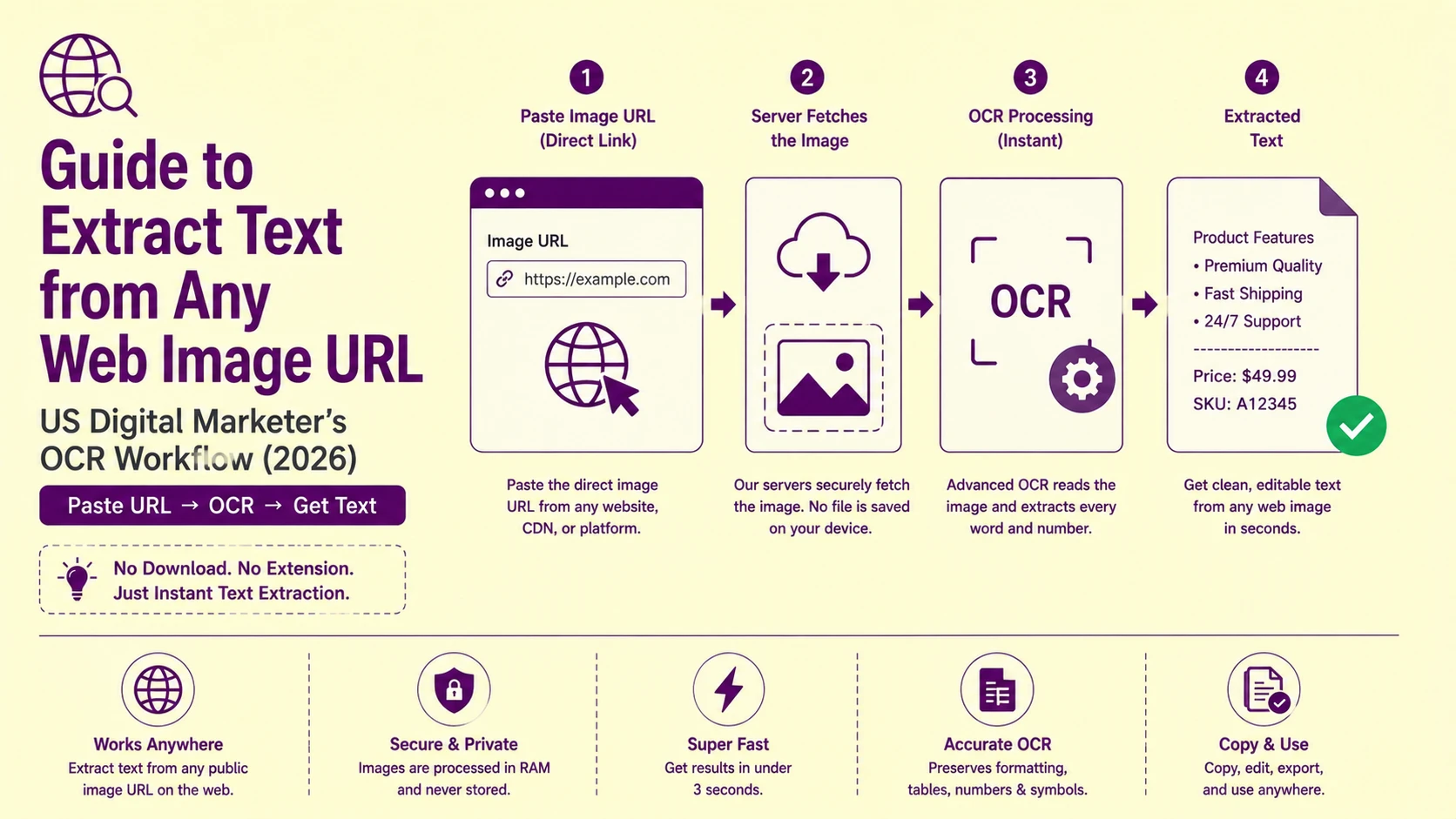
When a user pastes a direct image URL into PictureText's Image to Text from URL tool, the following server-side sequence executes:
-
HTTP GET request is issued from PictureText's server infrastructure to the target URL, not from the user's browser or device. The image file never downloads to the user's local machine at any point in the pipeline.
-
The image file is loaded into server-side transient memory, a temporary RAM buffer that exists only for the duration of the processing session. The file is not written to disk, not cached, and not retained after the extraction completes.
-
The OCR recognition pipeline executes against the in-memory image data , binarization, zone segmentation, character recognition, output serialization.
-
The extracted text string is returned to the user's browser session via the tool's response payload. The source image data is discarded from transient memory immediately after the response is transmitted.
This architecture has two significant operational advantages for US digital marketing workflows: it eliminates local storage overhead for large image audit batches, and it means the tool can access images hosted anywhere on the public web, on competitor servers, on CDN edge nodes, on social media platforms, on e-commerce marketplaces, without the user having any local copy of the file.
Why Most Image Links You Copy Do Not Work (The Direct URL Requirement)
The single most common failure mode in URL-based image OCR is pasting a page URL or a redirect URL instead of a direct image file URL. The distinction is architecturally absolute. A URL that points to an HTML page containing an image is not the same as a URL that points to the image file itself. So, the tool has no mechanism to navigate the HTML page, locate the image element, and construct the correct image URL automatically.
A direct image URL is a URL whose path component ends with an image file extension (.jpg, .jpeg, .png, .webp, .gif) or whose server response returns a Content-Type header of image/jpeg, image/png, image/webp, or similar image MIME type. Only direct image URLs produce successful extraction.
How to locate the direct image URL for any image on a US web page:
-
Chrome / Edge / Firefox: right-click on the image → select "Open image in new tab" → copy the URL from the new tab's address bar. The URL displayed in the address bar after the image opens in its own tab is always the direct image URL.
-
Chrome DevTools: F12 → Network tab → filter by "Img" → click the image element on the page , the URL displayed in the Request URL field is the direct image URL with all CDN query parameters included.
-
macOS Safari: right-click → "Copy Image Address" , copies the direct image URL to the clipboard without opening a new tab.
Also Read: How to Copy Code from Screenshots Without Indentation or Syntax Errors
US Platform Image URL Anatomy: How Major Platforms Structure Their CDN URLs
US digital marketers auditing competitor content, social media performance, or e-commerce listings encounter images hosted across a small set of dominant US CDN and platform infrastructure providers , each with a distinct URL structure that determines whether the direct URL is immediately usable or requires modification before the OCR tool can access it.
Amazon Product Images (images-na.ssl-images-amazon.com)
Amazon hosts all product listing images on its images-na.ssl-images-amazon.com CDN (North American regional node). Amazon product image URLs follow a consistent pattern:
https://images-na.ssl-images-amazon.com/images/I/[IMAGE-ID]._[VARIANT-CODE]_.jpg
The [VARIANT-CODE] segment controls the image dimensions and compression settings. Common variant codes include _SL1500_ (1500px longest edge), _SX500_ (500px width), _UX300_ (300px width). For OCR purposes, always use the largest available variant , replacing any size code with _SL1500_ or removing the variant code entirely to retrieve the original upload resolution.
A product image URL with _SX300_ returns a 300px thumbnail with character heights too small for reliable OCR on fine-print text (ingredient lists, specification tables). Replacing _SX300_ with _SL1500_ in the URL string retrieves the 1500px version with 5× the character pixel height , the correct input for table and specification text extraction.
Shopify Store Images (cdn.shopify.com)
Shopify product images are hosted at cdn.shopify.com with URL-based image transformation parameters appended as query strings or as underscore-prefixed suffixes before the file extension:
https://cdn.shopify.com/s/files/1/[STORE-ID]/products/[IMAGE-NAME]_[SIZE].jpg
Shopify supports image resizing via URL suffix: _1200x, _800x800, _grande (600px), _large (480px), _medium (240px), _small (100px), _thumb (50px). For OCR, use the _1200x suffix or remove the size suffix entirely to retrieve the master upload. Shopify's master images are typically 2048×2048px , optimal input resolution for product label and specification text extraction.
Google Business Profile and Google Maps Images
Google Business Profile photos and Google Maps place images are hosted on lh3.googleusercontent.com , Google's Lumen CDN. These URLs contain a base image identifier followed by a size parameter suffix:
https://lh3.googleusercontent.com/[BASE-ID]=s[SIZE]
The =s[SIZE] suffix controls the output pixel dimensions. Replacing =s200 with =s1600 retrieves the image at 1600px rather than 200px , a substantial resolution improvement for OCR on business signage, menu images, and informational displays captured in Google Business Profile photos. Maximum supported size for most Google CDN images is =s3840.
Facebook and Instagram (cdninstagram.com / scontent.cdninstagram.com)
Meta's image CDN (scontent.cdninstagram.com) uses time-limited signed URLs , image URLs that contain an embedded expiration timestamp and HMAC signature. A Facebook or Instagram image URL copied from the page is valid for the current browser session but expires within 24–48 hours. After expiration, the URL returns a 403 Forbidden response , and the OCR tool's server-side fetch receives the same 403 response.
For US social media marketing teams auditing Instagram competitor content or extracting text from Facebook ad creative images, the operational window for URL-based OCR is within the same browser session in which the URL was captured. Copy the direct image URL, paste it into PictureText's image-to-text-from-url tool, and execute the extraction immediately , do not batch these URLs for later processing.
Cloudflare Images (imagedelivery.net) and Fastly CDN
Many US SaaS platforms, media publications, and e-commerce brands route their images through Cloudflare Images (imagedelivery.net) or Fastly CDN. These CDNs support URL-based image transformation through path parameters:
Cloudflare Images format:
https://imagedelivery.net/[ACCOUNT-HASH]/[IMAGE-ID]/[VARIANT]
Replace [VARIANT] with public (original upload) or append /width=1200 to request a 1200px width version , whichever the account's transformation configuration supports.
Fastly CDN format:
https://[DOMAIN].global.ssl.fastly.net/[PATH]?width=[W]&height=[H]&quality=[Q]
For OCR, request quality=100 and the maximum supported width , typically 1200–2400px. Fastly serves WebP format by default when the requesting browser supports it; the OCR tool's server-side fetch sends standard HTTP headers that request the original format.
Also Read: How to Automatically Extract Text from Bulk Shipping Labels & Manifests
Why URL-Based OCR Is the Correct Tool for US SEO Content Audits
US SEO professionals conducting technical content audits face a specific class of competitor content that is systematically invisible to standard auditing tools: image-embedded text content that carries keyword relevance, entity information, and structured data that the competitor's pages rank for , but that no crawler, no keyword tool, and no content analysis platform can extract because it exists only in pixel form.
The most commercially significant image-embedded text categories in US digital marketing contexts:
Product specification tables embedded in images: Major US retailers (Best Buy, Home Depot, Target, Walmart) frequently embed product specification grids , dimensions, weight, material composition, compatibility lists , as image files rather than HTML tables. This content is crawlable by Google Vision AI but invisible to standard SEO crawlers like Screaming Frog, Ahrefs Site Audit, and Semrush's site crawler.
Promotional pricing banners: Sale price, discount percentage, and promotional offer text embedded in banner images carries direct commercial intent keyword value , "40% off," "Free shipping on orders over $35," "Buy 2 get 1 free" , that competitors can identify and respond to only if they can extract the text from the image.
Ingredient and nutrition label images: US food and supplement brands on Amazon and Shopify frequently upload product label photographs rather than entering label data as structured HTML , because the label photograph satisfies Amazon's listing requirements while requiring less manual data entry. The full ingredient list, allergen declarations, and nutrition facts are extractable via URL-based OCR without purchasing the product.
Event and webinar promotional graphics: US marketing agencies, SaaS companies, and professional associations embed speaker names, session titles, pricing tiers, and registration deadlines in promotional graphics , content that carries entity and topical relevance signals that a thorough content audit should capture.
Also Read: How to Convert Invoice Tables to Excel Without Ruining Data
URL Fetch Failure Modes: Why Some Image URLs Return Empty Results
Not every direct image URL produces a successful extraction. Understanding the specific HTTP failure modes and their causes enables US digital marketers to route failed URLs to the correct recovery path rather than assuming the tool is broken.
|
HTTP Status Returned |
Technical Cause |
US Platform Examples |
Recovery Path |
|
403 Forbidden |
Hotlink protection or signed URL expiration |
Instagram, Facebook, some Shopify stores |
Re-copy URL from live page session; disable hotlink referrer check |
|
404 Not Found |
Image deleted, URL path changed, CDN purged |
Any platform post-content-update |
Use Wayback Machine archive URL or find updated image URL |
|
301/302 Redirect |
URL redirects to HTML page, not image |
Short URLs, marketing redirect links |
Follow redirect chain to final image URL; use DevTools Network tab |
|
401 Unauthorized |
Image requires authentication or login session |
Behind-login content, paywall images |
No URL-based access , requires authenticated download |
|
200 but HTML returned |
URL points to page containing image, not the image file |
Any page URL pasted instead of image URL |
Right-click image → "Open image in new tab" → use that URL |
|
200 but SVG returned |
Vector SVG file , no raster pixel data to process |
Logo images, icon files, UI vector graphics |
Convert SVG to PNG raster at 300 DPI before OCR |
|
200 but WebP returned |
Modern image format not supported by all OCR tools |
Chrome-optimized CDN delivery |
Append ?format=jpg to URL if CDN supports format transformation |
|
Timeout |
Server response too slow for the fetch timeout window |
Slow origin servers, rate-limited CDNs |
Retry during off-peak hours or download locally and upload |
Hotlink Protection: The Most Common US E-Commerce Barrier
Hotlink protection is a server-side configuration that blocks HTTP requests for image files unless the Referer header in the request matches a whitelist of approved domains. The platform's intent is to prevent other websites from embedding their images and consuming their bandwidth , but it also blocks OCR tool server-side fetches, which arrive with no Referer header or a non-whitelisted Referer value.
When a direct image URL returns 403 Forbidden, hotlink protection is the most likely cause on US e-commerce platforms. The recovery path: open the image directly in a browser tab (which sends a Referer header matching the platform's own domain , passing the hotlink check), then right-click → Save Image As to download locally, and upload the downloaded file to PictureText.org's standard image upload interface rather than the URL-based tool.
The Competitive Intelligence Use Case: Extracting Competitor Pricing and Feature Tables
For US SaaS companies, e-commerce brands, and digital marketing agencies, the highest-value application of URL-based image OCR is competitive pricing and feature table extraction , recovering structured competitor data from pricing page screenshots, comparison chart images, and feature matrix graphics that the competitor has embedded as images to prevent easy scraping.
The extraction workflow for a competitive pricing audit:
Step 1: Identify image-embedded pricing content: use Chrome DevTools (F12 → Elements tab) to inspect the competitor's pricing page. Look for tags in sections that visually display pricing tables, feature matrices, or comparison charts. Any pricing information rendered inside an
element rather than HTML table cells is image-embedded and requires OCR extraction.
Step 2: Extract direct image URLs: right-click each pricing image → "Open image in new tab" → copy the address bar URL. For pages with multiple pricing tier images, collect all direct URLs before switching to the OCR tool.
Step 3: Paste each URL into PictureText's Image to Text from the URL tool at picturetext.org/en/image-to-text-from-url. The server-side fetch retrieves the image directly from the competitor's CDN , no file downloads to your machine, no bandwidth consumed from the competitor's image server that would appear in their analytics as a download event from your IP.
Step 4: Structure extracted data: copy the extracted text into a Google Sheet with one row per competitor pricing tier. Use the extracted feature list as column headers. Populate the matrix with each competitor's feature availability , building a side-by-side comparison that no standard scraping tool can construct from image-embedded pricing pages.
Step 5: Schedule periodic re-extraction: US SaaS pricing changes frequently , monthly or quarterly. Set a calendar reminder to re-run the URL-based extraction on the same competitor pricing image URLs on a defined cadence. If a URL returns 404 (the image was replaced), locate the new image URL using the DevTools method above.
Automating URL-Based Image Text Extraction for Large Audits
US digital marketing agencies managing content audits across hundreds of client and competitor URLs need a systematic URL collection and batch processing approach rather than a single-URL workflow.
Bulk URL collection protocol:
Use a browser extension like LinkGrabber (Chrome) or Link Klipper to extract all src attribute values from a target page , producing a complete list of all image URLs referenced by that page's HTML. Filter this list to retain only URLs ending in .jpg, .png, .webp, or .gif (excluding tracking pixels, 1×1 spacer GIFs, and icon files by file size threshold).
Prioritization filter: sort the collected image URLs by estimated pixel dimensions (available from the image element's width and height attributes in the HTML). Images with large declared dimensions (above 400×400px) are the most likely candidates for text-embedded content, small images (below 150×150px) are typically icons, avatars, or decorative graphics with no extractable text content.
Batch extraction: paste each prioritized URL into PictureText's Image to Text from URL tool in sequence. For large audit batches (50+ images), work through the URL list systematically by page section, extracting all images from the pricing section first, then features, then blog post graphics, to maintain structural context in the assembled output.
Root Cause Analysis: Step-by-Step Troubleshooting Checklist
Error: Pasted URL returns empty extraction result with no error message
Root Cause: The URL points to an HTML page containing an image rather than a direct image file. The tool's server-side fetch received an HTML document with Content-Type: text/html , not an image MIME type , and correctly returned no text extraction from the non-image response.
Fix: Right-click the image on the source web page → "Open image in new tab" → copy the URL from the new tab's address bar. This URL is guaranteed to be the direct image file URL , the browser only opens image MIME types in a bare new tab without HTML wrapper.
Error: Direct image URL returns 403 Forbidden
Root Cause: Hotlink protection on the source server is blocking the OCR tool's server-side HTTP fetch request because the request's Referer header does not match the platform's approved referrer whitelist.
Fix: Open the direct image URL in a browser tab (the browser's Referer header will match the originating page , passing the hotlink check). Right-click → Save Image As → save locally as PNG. Upload the locally saved file to PictureText.org's standard image upload interface instead of the URL-based tool.
Error: Amazon product image URL returns a very small thumbnail, extracted text is unreadable
Root Cause: The URL contains a small-size variant code (_SX200_, _SL500_, _thumb_) that instructs Amazon's image server to return a low-resolution thumbnail. Character pixel heights at 200px image width are insufficient for reliable OCR on specification tables and ingredient lists.
Fix: Edit the URL string to replace the variant code with _SL1500_ (1500px longest edge) or remove the variant code entirely to retrieve the original upload resolution. The character pixel heights at 1500px are 7.5× larger than at 200px , well above the reliable recognition threshold for all character sizes present in standard US product label text.
Error: Instagram image URL worked yesterday but returns 403 today
Root Cause: Meta's image CDN uses time-limited signed URLs with an embedded expiration timestamp. Instagram and Facebook image URLs expire within 24–48 hours of generation , after which the URL signature is invalid and the server returns 403 Forbidden regardless of referrer.
Fix: Return to the original Instagram or Facebook page, right-click the image → "Open image in new tab" → copy the new, freshly signed URL from the address bar. Execute the OCR extraction within the same browser session. Do not batch Instagram/Facebook image URLs for delayed processing , always extract immediately after copying.
Error: Competitor pricing table image extracts but numbers are jumbled columns appear merged
Root Cause: The pricing table image uses a complex multi-column layout where the zone segmentation algorithm did not correctly identify individual pricing tier columns as independent extraction zones. The horizontal scan pass merged values from adjacent tier columns into single strings.
Fix: If the full pricing table image produces merged extraction, crop the image into individual pricing tier columns using any basic image editor (or the macOS/Windows snipping tool on the opened image tab). Upload each cropped single-column image separately , each containing only one pricing tier's feature list and price. Concatenate the individual extractions into the comparison matrix manually. Single-column images eliminate zone segmentation ambiguity entirely.
Actionable Workflow Blueprint
Execute this sequence for clean, structured text extraction from any web-hosted image URL in a US digital marketing or SEO context:
-
Locate the direct image URL using the right-click → "Open image in new tab" method for every target image. Never paste a page URL into the URL OCR tool , verify the URL ends with an image file extension before proceeding.
-
Assess the URL platform using the CDN domain name. Identify whether the URL is from Amazon (images-na.ssl-images-amazon.com), Shopify (cdn.shopify.com), Google (lh3.googleusercontent.com), Meta (cdninstagram.com), or Cloudflare (imagedelivery.net) , and apply the platform-specific size parameter modification to retrieve the maximum available resolution before extraction.
-
Check for time-limited signed URLs (Meta platforms) and execute extraction immediately within the same browser session. Do not queue these URLs for later , the signature expires.
-
Paste the modified direct URL into PictureText's dedicated Image to Text from URL tool. This tool executes the server-side fetch and OCR pipeline without any file downloading to your local machine , preserving your local storage and keeping no record of the fetched image after extraction completes.
-
Structure the extracted text into a Google Sheet or Excel workbook with one row per source image URL and columns for: source URL, page location (pricing section / feature table / product label), extracted text, extraction date, and notes. This structured log serves as both the audit deliverable and the re-extraction reference for scheduled competitive monitoring.
-
Handle 403 failures with the local download fallback: open the image in a browser tab, save locally as PNG, upload to PictureText's standard upload interface. Never spend time attempting to modify URL headers or bypass authentication on protected content if server-side fetch is blocked, local download is always the correct recovery path.
-
Validate extracted pricing and feature data against the source image visually before entering the data into any competitive intelligence report or client deliverable. URL-based OCR produces reliable extraction for clean, high-contrast image text, but pricing decisions and competitive strategy documents require human verification of the source material before the extracted data is treated as authoritative.
For US digital marketing agencies managing monthly competitive content monitoring across dozens of competitor domains , tracking pricing changes, feature additions, promotional campaign text, and content strategy signals embedded in image assets, PictureText's Image to Text from URL tool provides the zero-download, server-side fetch architecture that keeps your competitive intelligence workflow clean, fast, and free of local file management overhead. Start your URL-based competitive content audit at picturetext.org and recover every keyword, every price point, and every feature claim your competitors have hidden inside their image assets.