
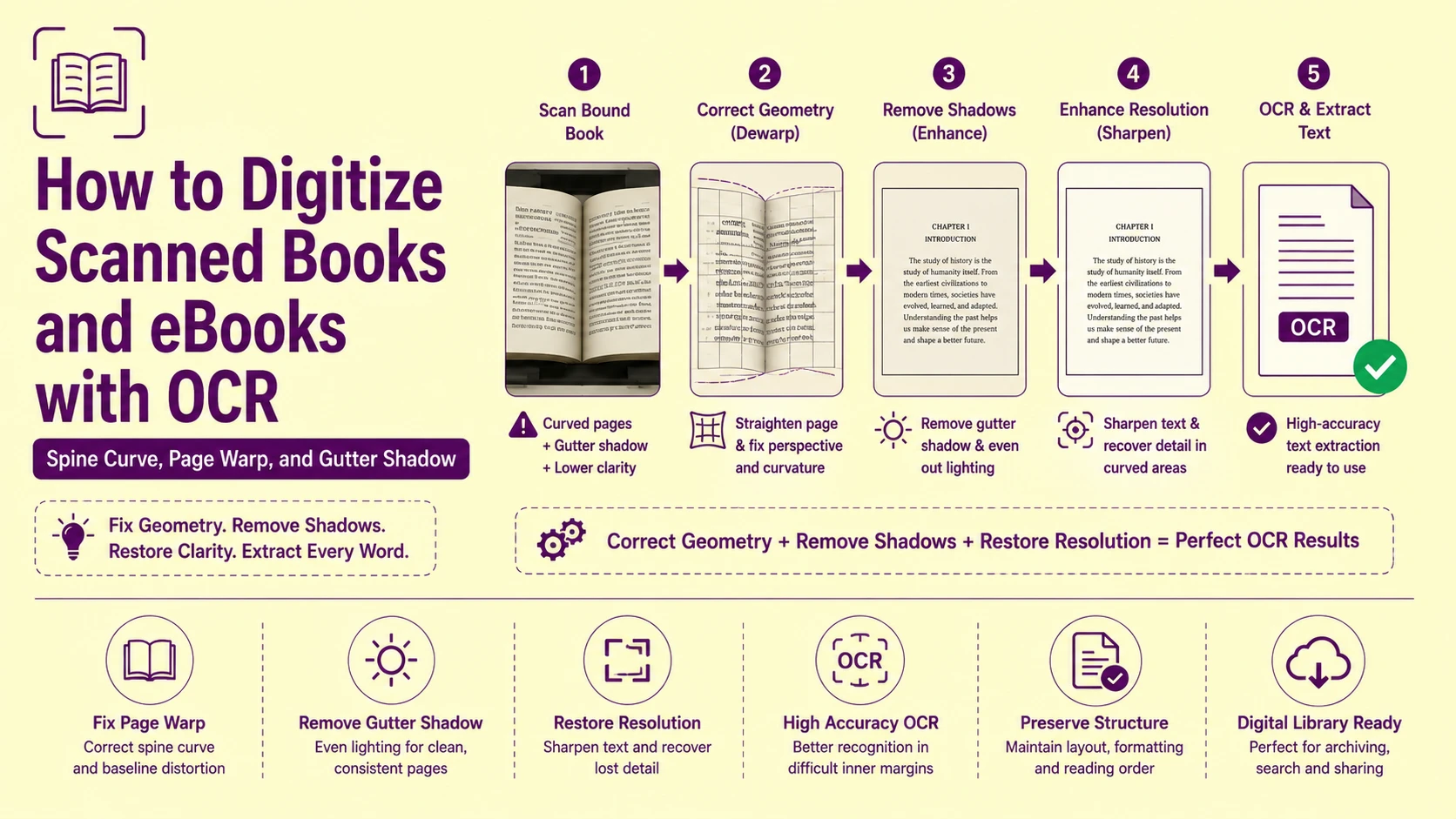
A researcher scanning a 400-page bound academic monograph on a flatbed scanner produces images where every page within 3cm of the spine is geometrically distorted, shadow-darkened, and baseline-curved — regardless of how carefully the book is pressed against the scan glass. The physical binding prevents the inner page margin from lying flat against the platen. The pages curve upward toward the spine, pulling text baselines into non-linear arcs, reducing the effective scan resolution in the curved zone by 30–60%, and casting a progressive shadow gradient that drops background pixel intensity from 240 (white paper) to 140 (medium grey) across the gutter region. Every character in that shadow zone is at elevated binarization failure risk.
This is not a scanner quality problem. It is a bound document geometry problem — a physically unavoidable consequence of scanning content that is attached to a rigid spine, processed by an imaging system designed for flat, unbound pages. Understanding the specific geometric and photometric distortions that spine binding introduces — and the preprocessing pipeline that corrects each one — is the technical foundation of any book digitization workflow that produces research-grade output rather than a partially readable approximation.
The Three Independent Distortion Classes in Bound Book Scanning
Bound book scanning introduces three physically distinct distortion classes that operate simultaneously and independently. Each requires a separate preprocessing correction, and they must be applied in a specific sequence — correcting them out of order produces artifacts that the subsequent stages amplify rather than resolve.
Class 1 — Geometric distortion: Page curl and spine curvature warp the physical text surface away from the scan plane, introducing non-linear baseline curvature, character width compression in the curved zone, and perspective foreshortening of characters near the spine.
Class 2 — Photometric distortion: The raised page surface in the gutter zone receives less illumination from the scanner's fluorescent or LED light bar than the flat outer page regions, producing a shadow gradient that reduces effective contrast between ink and paper across the full inner margin.
While gutter shadows introduce progressive dark gradients across light pages, handling inverted illuminated content requires dedicated negative image processing for white text on dark backgrounds to invert and normalize background values.
Class 3 — Resolution distortion: Characters printed on the curved page surface near the spine are physically farther from the scan glass than characters on the flat outer page. Because the scanner's optical system has a fixed focal plane at the glass surface, characters above the focal plane are captured at reduced effective resolution — the optical equivalent of depth-of-field blur in camera photography.
These three distortion classes affect spatially overlapping regions of the page — all three are most severe at the spine edge and diminish toward the outer margin — but they require fundamentally different correction algorithms. Geometric correction reshapes the coordinate space. Photometric correction adjusts pixel intensity values. Resolution correction applies deconvolution sharpening. None of the three corrections substitutes for the others.
Page Curl Geometry: The Mathematics of Spine-Induced Baseline Curvature
The geometric distortion introduced by book page curl follows a predictable mathematical model. A bound page curves away from the scan plane along a cylindrical surface whose axis runs parallel to the spine binding — the page does not warp randomly, it follows the arc of a cylinder whose radius is determined by the book's binding tightness and paper stiffness.
This cylindrical surface model has an important practical implication: the amount of geometric distortion at any point on the page is a deterministic function of that point's horizontal distance from the spine. Characters at distance x from the spine experience a baseline elevation of h(x) = r - √(r² - x²) above the scan plane, where r is the cylinder radius. Characters at distance x also experience a character width compression of cos(arcsin(x/r)) — meaning characters close to the spine appear narrower than their true width because the curved surface foreshortens them in the scan direction.
In practice, this model means that a character printed at 10pt at the spine edge may appear as a 7–8pt character in the scanned image — below the reliable diacritic extraction threshold established in our guide on extracting accented characters and Unicode text — not because of font size but because of geometric compression. This compression is recoverable through the correct page dewarp algorithm but is entirely unrecoverable if the correction is not applied before the recognition pass executes.
Page Dewarp Algorithms: Cylindrical Model vs. General Surface Estimation
There are two principal approaches to correcting bound book page curl, and selecting between them correctly is the most consequential algorithm decision in a book digitization pipeline.
Cylindrical Dewarp: Fast, Physically Grounded, Limited Generality
Cylindrical dewarp exploits the physically grounded observation that a bound page curves along a cylindrical surface. The algorithm:
-
Detects the spine edge position as a vertical boundary at which text baseline curvature begins
-
Estimates the cylinder radius r from the measured baseline curvature of detected text lines
-
Applies the inverse cylindrical mapping to every pixel in the curved zone — mapping each pixel from its distorted position on the curved surface back to its correct position on a flat page
The cylindrical model requires only one free parameter (the cylinder radius r) and is computationally fast. It produces excellent results for books with consistent binding tightness and uniform paper stiffness — the majority of commercially bound monographs and textbooks.
The failure case: books with non-uniform page curl — very old books with dried, stiffened pages that curve differently on different pages; softcover paperbacks with flexible spines that droop rather than curve cylindrically; oversized art books where page weight produces gravity-induced sag orthogonal to the cylindrical axis. For these cases, the cylindrical model's single-parameter assumption is insufficient.
General Surface Dewarp: Accurate, Computationally Intensive, Parameter-Rich
General surface dewarp makes no assumption about the surface curvature shape. It detects a dense grid of text line keypoints across the full page — using the detected text baselines as ground truth for what a flat, undistorted page should look like — and computes the general surface warp function that maps the detected curved keypoint positions back to a flat grid.
The algorithm fits a thin-plate spline (a two-dimensional generalization of the cubic spline) to the detected keypoint displacements, producing a continuous, differentiable warp function that correctly handles non-cylindrical, asymmetric, and locally variable page curl profiles.
General surface dewarp produces measurably superior results for the non-uniform curl cases where cylindrical dewarp fails. The computational cost is 3–8× higher than cylindrical dewarp per page — a significant factor in bulk digitization workflows processing hundreds of pages per session.
Selection rule: apply cylindrical dewarp as the default for all commercially bound hardcover and softcover books. Apply general surface (thin-plate spline) dewarp for incunabula, handbound manuscripts, very old paperbacks with non-uniform page aging, and any document where visual inspection reveals non-cylindrical curl patterns.
Gutter Shadow: The Photometric Distortion That Binarization Cannot Handle Alone
The gutter shadow — the progressive darkening of the inner page margin in a bound book scan — is produced by a direct physical mechanism: the raised curved page surface near the spine blocks the scanner's side-illumination light bar from reaching the inner margin at the same angle and intensity as the outer page regions.
Scanner illumination systems use a fluorescent tube or LED bar positioned at the side of the scan carriage, angled to illuminate the scan glass surface at approximately 20–30 degrees. On a flat page, this illumination geometry produces uniform coverage. On a curved page surface rising toward the spine, the raised section near the spine casts a self-shadow — the page elevation itself blocks the lateral illumination from reaching the inner few centimeters of the page, reducing effective illumination by 30–60% in severe cases.
The pixel-level consequence: background paper pixels in the gutter shadow zone drop from their standard value of 220–240 (near-white) to 140–180 (medium grey). Ink character pixels in the same zone drop from their standard value of 20–40 (near-black) to 60–100 (dark grey). The effective contrast ratio between ink and paper in the gutter zone collapses from approximately 200 intensity points (standard) to 80–120 intensity points (shadow-affected).
At 80–120 points of effective contrast, Otsu global binarization — which sets a single threshold for the entire page — places its threshold value between the bright outer-margin background and the dark gutter-shadow background, not between ink and paper within the gutter zone. The gutter region's background pixels fall below the global threshold and are classified as ink — producing a dense field of false-positive "character" pixels that the connected-component analysis cannot distinguish from genuine ink strokes.
Correcting Gutter Shadow: CLAHE, Polynomial Background Modeling, and Flatfield Correction
Three preprocessing approaches address gutter shadow, each with different accuracy/complexity tradeoffs:
CLAHE: Fast, Effective for Moderate Shadow Gradients
CLAHE (Contrast Limited Adaptive Histogram Equalization) normalizes contrast within local image tiles independently, compensating for the illumination gradient by treating each tile's histogram separately. For moderate gutter shadow gradients — where the background intensity drop is less than 80 intensity points across the page width — CLAHE reliably recovers adequate ink-to-paper contrast in the shadow zone without any shadow profile modeling.
CLAHE is the correct default for most bound book scans. It requires no calibration data, no background model estimation, and executes in a single preprocessing pass before binarization.
Polynomial Background Modeling: Precise, Requires Clear Background Samples
Polynomial background modeling estimates the illumination gradient function by sampling pixel intensities from regions of the page that are known to be background (no ink) — typically the inter-line whitespace regions detected by the text line segmentation algorithm. The sampled background intensities are fitted to a 2D polynomial surface that models the illumination gradient across the full page.
The fitted polynomial background model is then subtracted from the page image, replacing the variable-intensity background with a uniform white field while leaving the ink pixel values (which deviate from the background model by their ink density) intact. The result is a background-corrected image with uniform white background across the full page — including the gutter shadow zone — suitable for standard Otsu binarization.
Polynomial background modeling produces more accurate gutter shadow correction than CLAHE for severe gradients (background intensity drops above 80 points), but requires clean inter-line background samples — which are unavailable in pages with very dense text, marginalia, or decorative borders extending to the page edge.
Flatfield Correction: The Most Accurate Approach, Requires Calibration Scan
Flatfield correction is the photographic calibration technique used in scientific imaging and high-end document digitization workflows. It requires capturing a calibration scan of a uniformly white reference target (a blank white sheet of paper) on the same scanner before document scanning begins. The calibration scan captures the scanner's illumination non-uniformity profile — including the gutter shadow gradient — as a spatial sensitivity map.
Each subsequent document scan is divided pixel-by-pixel by the calibration scan's sensitivity map, normalizing out the scanner's illumination non-uniformity at the pixel level. The result is a document image corrected for the scanner's specific illumination profile — including the lateral illumination gradient that produces gutter shadow.
Flatfield correction is the most accurate gutter shadow remedy and is the standard technique in library digitization programs and archival scanning workflows. The calibration overhead is minimal (one reference scan per scanning session) and the per-page correction is computationally trivial (one division operation per pixel).
Two-Page Spread Scanning: Separating Facing Pages Before OCR
Most flatbed book scanners capture two-page spreads — both the left and right pages of an open book in a single scan. The OCR engine must process these as two independent documents, not as a single wide page of continuous text. Failure to separate the two pages before OCR produces a reading order that horizontally interleaves the left and right page text at every line — merging the first line of the left page with the first line of the right page, the second line of the left with the second line of the right, and so on throughout the extraction.
The correct processing sequence for two-page spread scans:
-
Detect the spine center line as the vertical axis of minimum text density (the gutter region between the two pages has lower text density than the page interiors — though not zero, since the gutter shadow often produces false character candidates)
-
Split the scan image at the detected spine center line into two independent page images
-
Apply geometric and photometric corrections to each half-page independently — the left and right pages have mirror-symmetric gutter shadow gradients and opposing curl directions
-
Process each corrected half-page through the OCR engine as an independent document
-
Assemble the extracted text in correct reading order: full left page text, then full right page text (for LTR scripts) or full right page text, then full left page text (for RTL scripts)
For complex layouts like double-page academic spreads or periodicals with sidebar notes, review our technical breakdown on fixing multi-column OCR layout errors.
Paper Type and Age: How Document Material Properties Affect Scan Quality
The physical material properties of the book's paper stock introduce additional distortion variables that interact with the geometric and photometric corrections described above.
|
Paper Type |
Typical Age |
Yellowing Level |
Bleed-Through Risk |
Recommended DPI |
Special Preprocessing |
|
Acid-free archival paper |
Any age |
Minimal |
Very low |
300 DPI |
Standard pipeline |
|
Wood pulp (standard book paper) |
<30 years |
Slight cream |
Low |
300 DPI |
Mild contrast boost |
|
Wood pulp (standard book paper) |
30–70 years |
Medium yellow |
Moderate |
400 DPI |
CLAHE + color channel extraction |
|
Wood pulp (acidic) |
>70 years |
Heavy brown |
High |
400–600 DPI |
Color channel extraction mandatory |
|
Newsprint |
Any age |
Heavy yellow-brown |
High |
400 DPI |
Blue channel extraction + CLAHE |
|
Coated glossy (art books) |
Any age |
Minimal |
None |
300 DPI |
Specular glare management |
|
Thin paper (Bible paper) |
Any age |
Minimal |
Very high |
600 DPI |
Bleed-through subtraction pass |
|
Vellum / parchment |
>100 years |
Variable translucency |
Inherent |
600 DPI |
Multi-spectral imaging recommended |
When dealing with severely degraded historical volumes or ancient press runs, standard thresholds may fail. Refer to our operational guide on OCR settings for faint and historical fonts for low-contrast document recovery.
Paper bleed-through — where ink from the reverse side of a page is visible through the paper as a faint ghost text — introduces false character candidates in the OCR zone segmentation pass. The bleed-through text is typically lower in contrast than the front-side text (40–80 intensity points vs. 150–200 intensity points for front-side ink) but is spatially dense enough to contaminate the binarized output with recognizable false characters.
The standard bleed-through correction applies a background subtraction using the reverse-side scan: scanning both sides of each leaf, aligning the reverse-side scan geometrically to the recto scan, inverting the reverse-side pixel values, and subtracting the inverted reverse scan from the recto scan — canceling the bleed-through component while preserving the front-side ink values intact.
Marginalia, Annotations, and Handwritten Additions: Separating Printed from Manuscript Content
Historical books and working academic texts frequently contain marginalia — handwritten annotations, underlines, highlighting marks, and inter-linear additions made by previous owners or scholars. These handwritten elements occupy the same spatial zones as the printed text and are captured in the same scan — presenting the OCR engine with a mixed print/manuscript input that neither a standard print OCR model nor a handwriting recognition model handles optimally alone.
The segmentation challenge: printed text and handwritten annotation may overlap in the same spatial zone. A reader's ink annotation may partially overwrite a printed word. A handwritten note in the margin may use the same spatial column as a page number. Standard zone segmentation treats all ink marks as equivalent and assigns them to a single zone type, mixing printed and manuscript content in the extraction output.
The correct approach for mixed-content book pages uses a two-pass extraction architecture:
-
Pass 1 — Print extraction: Configure the OCR engine for printed text recognition (standard character matrix matching against typed font templates). Extract all high-confidence printed text regions. Flag all low-confidence regions as potential manuscript additions.
-
Pass 2 — Handwriting extraction: Apply the handwriting recognition model to the flagged low-confidence regions. Extract handwritten content as a separate, independently tagged text stream.
-
Output assembly: Merge the two extraction streams with spatial coordinate tags identifying each token as [PRINT] or [MANUSCRIPT] — allowing downstream researchers to filter by content type and preserve the distinction between the original author's text and subsequent reader annotations.
Root Cause Analysis: Step-by-Step Troubleshooting Checklist
Error: Text near the spine extracts with characters compressed, narrowed, or missing entirely
Root Cause: Page curl geometric compression is reducing the effective pixel width of characters near the spine. Characters printed at 10pt appear as 7–8pt equivalents in the scanned image due to cylindrical surface foreshortening. At compressed widths, narrow characters (i, l, 1, :, ;) fall below the minimum pixel width for reliable character matrix matching and are either omitted or misclassified.
Fix: Apply cylindrical page dewarp before the recognition pass. Estimate the cylinder radius from the measured text baseline curvature in the curved zone (typically 80–150mm for standard hardcover bindings). Apply the inverse cylindrical mapping to recover correct character widths in the spine region. Re-run the recognition pass on the geometrically corrected image — character widths in the spine zone should recover to within 5% of their outer-margin equivalents after correct dewarp.
Error: Inner margin text extraction produces dense false-positive characters mixed with genuine text
Root Cause: Gutter shadow has reduced background pixel intensity in the inner margin to 140–180 (medium grey). Otsu global binarization classified these medium-grey background pixels as ink, producing false character candidates throughout the shadow zone that contaminate the genuine text extraction.
Fix: Apply CLAHE before binarization to normalize the illumination gradient across the full page. For severe gradients (background intensity below 150 in the shadow zone), apply polynomial background modeling to estimate and subtract the illumination gradient before binarization. Switch from Otsu global thresholding to Sauvola adaptive thresholding, which computes a separate local threshold for each image tile — correctly handling the intensity difference between the shadow inner margin and the bright outer margin without a single global compromise threshold.
Error: Two-page spread extraction returns text with left and right page lines interleaved
Root Cause: The OCR engine processed the full two-page spread as a single wide page, applying a single reading order pass that sequenced text by y-coordinate across the full image width — interleaving left-page and right-page lines at every horizontal scan level.
Fix: Detect the spine center line using text-density minimum detection across the horizontal image axis. Split the scan at the detected center x-coordinate into two independent half-page images before any OCR processing. Process each half independently and assemble the text outputs sequentially in the correct page order.
Error: Bleed-through from reverse-side text appears in extraction output as garbled words
Root Cause: Thin paper stock allows reverse-side ink to transmit through the page as low-contrast ghost characters. The binarization stage classified these bleed-through pixels as foreground ink, and the recognition engine extracted them as low-confidence character candidates — producing garbled word tokens interspersed with the correct front-side text.
Fix: Scan both sides of each leaf. Align the reverse-side scan to the recto scan using feature-point registration. Invert the reverse-side pixel values and subtract from the recto scan — canceling the bleed-through component. Apply binarization to the bleed-through-corrected image. Alternatively, apply color channel extraction using only the green channel from an RGB scan — bleed-through ink from the reverse side typically has lower green channel intensity than front-side ink, improving the contrast discrimination between genuine and bleed-through characters.
Error: Scanned book pages have wavy baselines that deskewing does not correct
Root Cause: Non-cylindrical page curl (common in very old books with stiffened paper, oversized art books with heavy page sag, or damaged books with irregular spine damage) produces warp profiles that the cylindrical dewarp model's single-parameter assumption cannot represent. The cylindrical correction straightens the dominant curl axis but leaves residual non-cylindrical distortion that manifests as wavy, non-horizontal baselines.
Fix: Switch from cylindrical dewarp to general surface dewarp using a thin-plate spline fitted to the detected text line baseline keypoints. Detect at least 5–8 text line baselines across the page height, sample multiple keypoints per baseline, and fit the thin-plate spline to the full keypoint set — producing a general warp correction that handles non-cylindrical curl profiles that the cylindrical model cannot represent.
Actionable Workflow Blueprint
Execute this sequence for clean, research-grade text extraction from any bound book scan:
-
Perform a calibration flatfield scan at the start of each scanning session by placing a clean white sheet on the scanner glass and capturing a full-resolution scan. Save this calibration image for pixel-level illumination normalization on all subsequent document scans in the session.
-
Scan at the correct DPI for the book's minimum text size. Body text in standard academic monographs (10–12pt) requires 300 DPI minimum. Footnotes and bibliographic references (7–9pt) require 400 DPI. Books with diacritical marks in small-point text require 400–600 DPI to maintain reliable diacritic pixel cluster sizes above the connected-component threshold.
-
Split two-page spread scans at the detected spine center line into independent left and right page images before any preprocessing or OCR processing begins. Never feed a two-page spread directly to the recognition engine.
-
Apply flatfield correction to each page image using the session calibration scan — dividing each document scan by the calibration scan pixel values to normalize the scanner's illumination profile and eliminate the gutter shadow gradient at the photometric level.
-
Apply cylindrical or general surface dewarp based on the book's binding type and paper condition. Use cylindrical dewarp for standard commercial bindings. Switch to thin-plate spline general surface dewarp for non-uniform curl profiles identified by visual inspection of baseline waviness after cylindrical correction.
-
Upload the corrected page images to PictureText.org's Layout Analysis OCR Engine at picturetext.org, which applies Sauvola adaptive binarization per page tile — handling any residual illumination variation that flatfield correction did not fully eliminate — and executes per-line baseline normalization to correct residual baseline curvature below the dewarp algorithm's correction resolution.
-
Run bleed-through subtraction for any book printed on paper thinner than 60gsm — Bible paper, onion skin, and lightweight academic journal paper all require this step. Scan the reverse side of each leaf, align to the recto scan, and subtract the inverted reverse-side values before binarization.
-
Apply the two-pass print/manuscript extraction for any book with handwritten marginalia, underlines, or inter-linear additions. Extract printed and handwritten content as independently tagged streams to preserve the scholarly distinction between original text and reader annotation.
-
Assemble the final output in correct page reading order — left page then right page for LTR scripts. Apply Unicode NFC normalization to the complete assembled string if the book contains any diacritic-bearing language content, eliminating NFD/NFC mismatch failures in downstream search and comparison operations.
For academic libraries, university digitization centers, and research institutions processing book collections at scale — hundreds of volumes with thousands of pages per digitization campaign — PictureText's batch book digitization pipeline applies the full correction stack automatically: flatfield normalization, page split, cylindrical dewarp, CLAHE gutter shadow correction, Sauvola adaptive binarization, and per-line baseline normalization — delivering consistently formatted, reading-order-correct, Unicode-normalized text output for every page in the collection. Begin your book digitization workflow at picturetext.org and recover the full textual content of your bound collection with the archival precision that scholarship demands.