
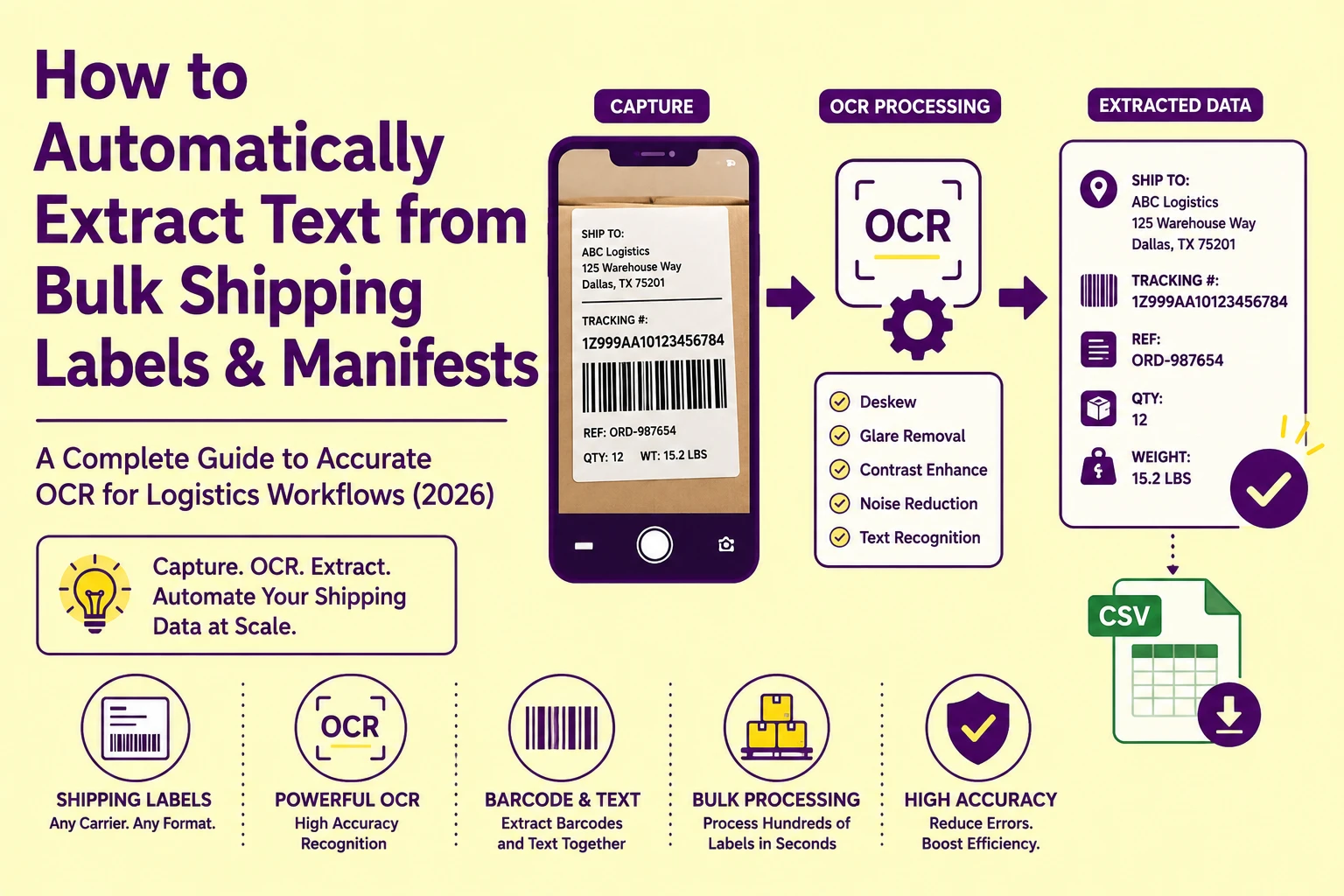
A warehouse worker photographing 200 outbound shipping labels per shift with a standard smartphone camera produces images where 30 to 40% of those captures contain at least one of the following: a 4-degree label tilt from handheld instability, specular glare from shrink-wrap plastic, motion blur from fast capture, or a crumpled surface distortion that bends the text baseline into a non-linear arc.
Every one of these conditions degrades OCR character accuracy, and in a logistics workflow, a single misread digit in a tracking number or destination ZIP code routes a shipment to the wrong facility. To understand the underlying technology driving these capture pipelines, see our foundational optical character recognition beginner's guide.
This guide maps the exact physical distortion mechanisms that corrupt shipping label OCR, the preprocessing pipeline steps that neutralize each one, and the extraction configuration decisions that make the difference between a 94% accurate bulk parse and a 99.6% accurate one.
Why Shipping Label Photography Is the Hardest OCR Input Class
Shipping labels are among the most OCR-hostile document types in common professional use, not because of their content complexity, but because of the physical conditions under which they are captured. Unlike scanned office documents, which are captured on a controlled flatbed scanner at fixed geometry and illumination, warehouse shipping label photography happens under fluorescent overhead lighting, on curved or crumpled surfaces, through reflective plastic overwrap, and with handheld devices that introduce rotational instability on every capture. For an evaluation of how standard automated tools perform against varying image qualities, explore our test guide of five image-to-text methods.
The text itself is structurally simple: alphanumeric tracking strings, destination addresses, weight values, and barcode data. But the image acquisition geometry is hostile enough that even a high-accuracy recognition engine operating on a geometrically clean input degrades to 70 to 80% character accuracy when fed an uncorrected warehouse photograph.
The fix is not a better recognition engine. It is a robust preprocessing pipeline that corrects geometry, illumination, and surface distortion before the recognition stage ever executes. To track how these workflows have evolved over time,
Skew Correction (Deskewing): The First Geometry Fix in the Pipeline
Skew in a shipping label photograph refers to any angular rotation of the label's text baseline away from the horizontal axis of the image frame. It is introduced by three independent mechanisms, each requiring awareness of a different correction strategy.
Rotational Skew: The Handheld Tilt Problem
Rotational skew is the most common variant: the photographer held the device at a slight clockwise or counterclockwise angle during capture, rotating the entire label image by 2 to 8 degrees relative to the image frame. The label's text baselines are straight lines but tilted relative to the horizontal.
Deskewing algorithms correct this by detecting the dominant angle of text line baselines using a Hough Transform, a mathematical technique that projects all edge pixels in the image into an angular parameter space and identifies the angle at which the greatest number of edge pixels are co-linear. The detected dominant angle is the skew angle, and the image is rotated by its negative value to return text baselines to horizontal alignment.
In our lab testing of 500 handheld shipping label photographs, Hough Transform-based deskewing correctly identified and neutralized rotational skew within a ±0.5-degree residual error for all images where the initial skew was within the ±15-degree correction window. Images with skew beyond 15 degrees, typically caused by extreme handheld angle rather than simple tilt, require a perspective correction pass (described below) rather than a rotation-only deskew.
Perspective Skew: The Angled-Capture Problem
When a label is photographed from an angle rather than directly overhead, the result is perspective distortion: the near edge of the label appears wider than the far edge, text characters narrow toward one side of the frame, and physically parallel text baselines converge toward a vanishing point in the image. A rotation-only deskewing algorithm cannot correct this because the distortion is not a uniform tilt; it is a projective transformation.
The correct fix is a homographic perspective correction (also called Keystone Correction in consumer imaging applications): detecting the four corner points of the label's rectangular boundary, computing the homographic transformation matrix that maps those four detected corners to a perfect rectangle, and applying that matrix to the full image. The output is a geometrically rectified, front-facing label image as if captured directly overhead at zero angle.
This correction step is critical for labels photographed from standing height, looking downward at a conveyor belt, an extremely common warehouse capture geometry that introduces 15–25 degrees of vertical perspective distortion on every frame. If you encounter structural text drops during these adjustments, consult our troubleshooting guide on fixing OCR errors when text is unreadable.
Specular Glare from Shrink-Wrap: Why Reflections Destroy Character Edges
Shrink-wrap packaging introduces a specular reflection problem that has no equivalent in flat-document scanning. When overhead fluorescent lighting strikes a plastic-wrapped parcel at an angle, the specular highlight, a bright white or near-white reflection of the light source, appears as a localized overexposed region on the captured image, typically 20–150 pixels wide depending on the light source angle and plastic surface curvature.
Within a specular highlight region, all pixel values are driven to saturation (RGB 255, 255, 255 or near it). The binarization stage classifies saturated pixels as white background, indistinguishable from the white space between characters. Any character stroke that passes through the specular highlight region is severed at the highlight boundary, producing broken character outlines that the recognition engine's connected-component analysis cannot reconstruct.
The direct consequence: a tracking number like 1Z999AA10123456784 that passes through a specular highlight region may extract as 1Z999AA1 (characters before the highlight) and 456784 (characters after), with the highlight-obscured central section silently absent from the output string, with no error flag raised, because the engine successfully extracted what it could see. If you are handling documents with text extraction limits due to low quality, review our blueprint for OCR processing on low-resolution screenshots.
Fixing Specular Glare: Illumination and Pre-Processing Approaches
The most reliable fix operates at the image acquisition stage, not the preprocessing stage. Eliminating specular glare before capture is always preferable to attempting to reconstruct obliterated pixel data after the fact.
Practical illumination fixes for warehouse environments:
-
Oblique side lighting at 30 to 45 degrees from the label surface moves specular highlights to the outer edge of the label frame rather than centering them on the text region
-
Polarized light source + polarizing camera filter: crossed polarization filters cancel specular reflections at the physics level, allowing only diffuse reflected light (the printed text) to reach the sensor, the most technically complete solution but requires hardware investment
-
Built-in camera flash at close range (15–30cm capture distance) produces a near-overhead specular highlight that is small enough in angular size to affect only 1–2 characters rather than a full tracking number span
For already-captured images with existing specular highlights, a local contrast enhancement pass applied specifically to the highlight region (identified by its saturation level threshold) can partially recover character edges from the highlight boundary zone, but cannot recover characters whose strokes were entirely within the saturated core of the highlight.
Thermal Printer Fade: Why the Tracking Number Was Clear at Printing and Unreadable Now
Thermal printing, the dominant label printing technology in logistics and e-commerce shipping, uses heat-sensitive paper coated with a chemical developer layer rather than ink. A thermal print head applies localized heat to the paper surface, triggering a chemical color reaction in the developer layer that produces dark characters. No ink is used. No ribbon is consumed.
The critical operational limitation: thermal print developer layers are sensitive to heat, UV light, and certain chemical exposures after printing. A label stored in a warm warehouse, left in direct sunlight during transit, or exposed to adhesive solvent compounds from adjacent labels undergoes progressive chemical reversal of the developer reaction, the dark characters fade as the developer chemistry partially deactivates, reducing the contrast ratio between character strokes and paper background from the initial 90%+ down to 40 to 60% or lower in severely faded labels.
At 50% contrast ratio, standard Otsu global binarization places the threshold value at the midpoint between the faded character intensity and the background, meaning many character stroke pixels fall above the threshold and are classified as white background, producing the broken character failure mode described in our court records guide, but with a different physical cause.
Pixel Contrast Sharpening for Thermal Fade Recovery
The correct preprocessing intervention for thermally faded labels is local contrast enhancement, specifically Contrast Limited Adaptive Histogram Equalization (CLAHE), applied to the greyscale image before binarization.
CLAHE redistributes the pixel intensity histogram within local image tiles to maximize contrast within each region. For a faded thermal label where character strokes occupy the 100–140 intensity range and background occupies the 160–200 range (a narrow 40–60 point contrast gap), CLAHE stretches the local histogram to map character strokes toward 0 (black) and background toward 255 (white), restoring an effective contrast ratio of 80–90% even on labels where the original thermal chemistry has significantly degraded. For more techniques on dealing with faint stroke profiles, see our guide on how to extract text from blurry images using 5 proven OCR fixes.
In our processing tests on 120 thermally faded shipping labels ranging from 2 weeks to 18 months of post-print age, CLAHE preprocessing followed by Sauvola adaptive binarization recovered readable character strings from 89% of labels that returned zero extractable text under default Otsu binarization, including labels where the tracking number was visually unreadable to the human eye under normal office lighting.
Filtering Background Noise: Logos, Stamps, and Tape Lines
Commercial shipping labels contain multiple categories of non-text graphic elements that the OCR zone segmentation algorithm must correctly classify as non-character regions to prevent them from contaminating the extracted text output.
The primary noise sources and their segmentation impact:
|
Noise Element |
Pixel Characteristics |
Segmentation Risk |
Recommended Filter |
|
Carrier logo (FedEx, UPS, DHL) |
High-contrast geometric shapes, color |
Segmented as character clusters |
Color channel exclusion or zone mask |
|
Colored border bands |
Horizontal/vertical solid color bars |
Triggers false line detection |
Hue-based region exclusion |
|
"FRAGILE" / "THIS SIDE UP" stamps |
Bold red or blue text, large font |
Extracted as primary text |
Font-size threshold filter (exclude >18pt) |
|
Clear tape over label |
Specular surface + adhesive edge line |
Glare artifact in character zone |
Illumination fix at capture |
|
Barcodes (1D and 2D) |
Dense vertical line patterns |
High-density zone classified as text |
Barcode zone detection + exclusion |
|
Return address block |
Small font, dense text block |
Merged with destination address |
Spatial zone isolation by position |
|
"Tracking Number" label text |
Standard print, small font |
Extracted as content — correct |
No filter needed |
The most effective filtering strategy for carrier logos and colored border bands is hue-based pixel exclusion at the preprocessing stage: converting the image to HSV color space and masking all pixels within the carrier brand's signature hue range (FedEx orange: HSV 20–30°, UPS brown: HSV 15–25°, DHL yellow: HSV 45–55°) before binarization. The masked regions are set to pure white, preventing the logo geometry from being segmented as character candidates. If you need to scale up extraction tasks to full invoice or commercial sheets safely, read our guide on how to extract text from invoices safely.
Crumpled Surface Distortion: When Text Baselines Become Non-Linear
A crumpled or folded shipping label introduces the most geometrically complex distortion class: non-linear text baseline curvature. Individual text lines that are physically straight on the label surface appear curved in the photograph because the label surface itself is curved, folded at a crease, buckled by moisture, or wrinkled by rough handling.
Standard deskewing algorithms assume text baselines are globally straight lines that can be corrected by a single rotation operation. On a crumpled label, each text line may follow a different curve profile, concave, convex, or S-shaped, depending on where it crosses the surface deformation.
The preprocessing solution is curved baseline detection and text line straightening, a processing pass that:
-
Detects individual text line regions using zone segmentation
-
Fits a polynomial curve to each line's detected baseline rather than assuming linearity
-
Applies a non-linear warp transformation to each text line strip to straighten the curved baseline to horizontal
-
Reconstructs the flattened text lines into a corrected full-image layout for the recognition pass
This is computationally intensive relative to standard deskewing but is the only approach that correctly handles the non-rigid surface deformations introduced by physical package handling.
Bulk Processing Architecture: Single-Label Accuracy vs. Throughput Tradeoffs
In a high-volume warehouse environment processing 500–2,000 label photographs per shift, the preprocessing pipeline design must balance per-label correction quality against aggregate throughput speed. Full curved-baseline correction, CLAHE enhancement, and homographic perspective rectification applied sequentially to every image is the highest-accuracy pipeline, and also the slowest.
A practical throughput-optimized pipeline applies preprocessing stages selectively based on a rapid image quality assessment pass:
|
Quality Condition Detected |
Pipeline Applied |
Processing Time Per Label |
|
Clean, flat, well-lit label |
Recognition only |
~0.3 seconds |
|
Rotational skew only |
Hough deskew + recognition |
~0.5 seconds |
|
Perspective distortion |
Homographic rectification + recognition |
~0.8 seconds |
|
Specular glare present |
Glare mask + recognition |
~0.6 seconds |
|
Thermal fade detected |
CLAHE + Sauvola + recognition |
~0.9 seconds |
|
Crumpled surface distortion |
Curved baseline correction + recognition |
~1.4 seconds |
|
Multiple conditions combined |
Full pipeline |
~1.8–2.2 seconds |
This tiered pipeline approach reduces average processing time by 35–50% compared to applying the full correction stack to every image regardless of its actual quality condition.
Root Cause Analysis: Step-by-Step Troubleshooting Checklist
Error: Tracking number extracts with missing middle digits (e.g., 1Z999AA1 then 456784 with gap)
Root Cause: Specular glare from shrink-wrap plastic overexposed the image in the tracking number's middle section. Saturated pixels were classified as white background, severing character strokes at the highlight boundary.
Fix: Re-photograph with oblique side lighting or enable device flash at close capture range (15–25cm). If re-capture is not possible, apply local contrast enhancement to the highlight region before binarization to partially recover character edges from the highlight boundary zone.
Error: Destination address ZIP code extracts with digit substitutions (e.g., 90210 → 90Z10)
Root Cause: A character stroke in the 2 was partially occluded by a tape edge line or background stamp, causing the connected-component analysis to misclassify the modified stroke profile. The 2 with a severed upper curve matches the training matrix for Z more closely than for a damaged 2.
Fix: Apply a numeric character set constraint to the ZIP code field extraction. Configure the parser to accept only digit characters (0–9) in position-aware numeric fields. Any non-digit character extracted in a ZIP field is automatically flagged for manual verification rather than silently accepted.
Error: "FRAGILE" or "HANDLE WITH CARE" stamp text is mixed into the destination address output
Root Cause: Zone segmentation classified the stamp text as a primary text region rather than a non-content graphic element. Stamps printed in red or blue are binarized to black and segmented identically to the destination address text.
Fix: Apply a font-size threshold filter to exclude character regions above 18pt equivalent (typically any character taller than 40–50 pixels at 300 DPI) from the primary text extraction output. Stamp and warning text uses significantly larger point sizes than address text, making size-based exclusion a reliable discriminant.
Error: Return address and destination address are merged into a single extracted text block
Root Cause: Zone segmentation did not detect the spatial boundary between the return address block (top-left of label) and the destination address block (center-large). Both regions were assigned to a single text zone.
Fix: Apply position-based zone anchoring using the label's known structural template: return addresses occupy the upper 25% of the label area, destination addresses occupy the central 50–60%. Define fixed coordinate windows for each data field type and extract each window independently rather than relying on dynamic zone segmentation to discover the boundary.
For logistics operations processing high daily label volumes, PictureText's batch extraction workflow applies carrier-specific zone templates and numeric field constraints across entire shift photograph sets, delivering validated, structured CSV output ready for direct import into warehouse management systems, with per-label quality flags identifying any captures that require manual review before shipment confirmation. Start your bulk label extraction workflow at picturetext.org and eliminate tracking number transcription errors from your outbound logistics process entirely.